Bookeeper is a modern bookkeeping service designed to keep your business organised, accurate, and confident with its numbers. We manage your day-to-day bookkeeping so you can focus on running your business, while your accountant or BAS agent handles the lodgements.
- Sydney, NSW
- 0451081081
- customer@bookeeper.com.au
- www.bookeeper.com.au
Best Bookkeeping Software for Small Businesses Australia
Spend less time on bookkeeping and more time running your business
Bookeeper is cloud-based bookkeeping software designed to help Australian small businesses manage invoices, expenses, customer payments, GST records, cash flow and financial reporting from one organised platform.
Whether you are a sole trader, tradie, family business or growing company, Bookeeper gives you practical tools to keep your financial records up to date without relying on complicated spreadsheets or disconnected systems.
Learn more about how our full range of Bookkeeper Services can streamline your day-to-day operations.

What is bookkeeping software?
Bookkeeping software is a digital platform used to record and organise a business’s financial transactions. It can help business owners create invoices, track income and expenses, monitor unpaid accounts, reconcile bank transactions, maintain GST records and review financial reports.
For Australian small businesses, using online bookkeeping software can reduce manual administration, improve record accuracy and make it easier to prepare information for an accountant or BAS agent.
Bookeeper brings these everyday bookkeeping functions together in one secure, easy-to-use system.
Bookkeeping software built for Australian small businesses
Running a business involves more than attracting customers and completing jobs. You also need to know:
- What customers owe you
- How much your business is spending
- Whether cash flow is improving
- Which invoices are overdue
- What information is needed for GST and BAS preparation
- Whether the business is operating profitably
Bookeeper helps organise this information so you can understand where your business stands and make decisions using current financial records rather than guesswork.
It is suitable for businesses processing a small number of transactions as well as growing companies managing larger volumes of invoices, expenses and customer payments.
What can Bookeeper help you manage?
Professional invoicing
Create professional invoices and send them directly to customers without preparing each document manually.
Bookeeper helps simplify the billing process by keeping customer details, invoice records and payment information in one location. Depending on the functions available within your plan, you may also be able to use customised invoice templates, payment options and payment reminders.
Smart invoicing can help you:
- Create clear, professional invoices
- Maintain accurate customer records
- Monitor invoice status
- Identify overdue accounts
- Follow up unpaid invoices
- Improve visibility over incoming cash flow
Instead of searching through emails or spreadsheets, you can review invoice information from your Bookeeper account.
Expense tracking
Accurate expense records help you understand where your business money is going.
Bookeeper allows you to record and categorise business expenses, helping you maintain clearer records for budgeting, financial reporting and meeting ATO record-keeping requirements.
You can organise expenses such as:
- Fuel
- Equipment
- Stock and materials
- Office supplies
- Utilities
- Marketing
- Travel
- Staff-related costs
- Supplier payments
- General business purchases
Keeping expenses organised throughout the year also reduces the need to find missing information at tax or BAS time.
GST record management and BAS preparation
Australian businesses registered for GST need reliable records of taxable sales, purchases and GST amounts.
Bookeeper helps keep relevant income and expense records organised so the required information is easier to review when preparing a Business Activity Statement.
Rather than collecting information from multiple spreadsheets, folders and email accounts, your business records can be maintained within one bookkeeping platform in accordance with ATO Business Activity Statement (BAS) guidance.
Bookeeper can help you:
- Organise GST-related transactions
- Maintain sales and expense records
- Review business activity for a reporting period
- Prepare information for your accountant or BAS agent
- Reduce last-minute bookkeeping pressure
Bookeeper should only be described as providing direct BAS lodgement or formal ATO compliance when those functions have been confirmed.
Bank reconciliation support
Bank reconciliation involves comparing the transactions recorded in your bookkeeping system with the transactions shown in your business bank account.
Bookeeper helps you review and match financial records with bank activity, making it easier to identify missing transactions, duplicate entries or incorrect amounts.
Regular bank reconciliation can help:
- Improve bookkeeping accuracy
- Identify transaction errors
- Keep account balances current
- Detect missing income or expenses
- Maintain reliable financial reports
Up-to-date reconciliations give you greater confidence in the financial information you use to manage your business.
Cash-flow visibility
A profitable business can still experience financial pressure when customers pay late or expenses become due before income is received.
Bookeeper helps you monitor income, business expenses, customer payments and outstanding invoices so you can better understand your cash position.
Improved cash-flow visibility can help you:
- Follow up overdue invoices
- Plan supplier payments
- Prepare for upcoming expenses
- Identify periods of reduced income
- Make more informed spending decisions
- Plan future business growth
Having current information available allows you to respond earlier rather than discovering a cash-flow problem after it has become urgent.
Financial dashboard and business reporting
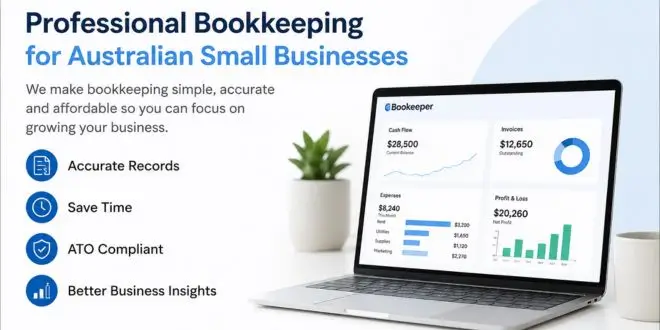
Bookeeper provides an organised view of important financial information so you can monitor business performance throughout the month.
Depending on the reporting tools available, your dashboard may display information such as:
- Total income
- Business expenses
- Outstanding invoices
- Customer payments
- Cash-flow position
- Profit trends
- Financial summaries
These insights help you understand how the business is performing without waiting until the end of the financial year.
Financial reports can also provide useful information to your bookkeeper, accountant or BAS agent.
Cloud-based access
Bookeeper is cloud-based bookkeeping software, allowing you to access your business records online from compatible devices with an internet connection.
You can manage bookkeeping from:
- Desktop computers
- Laptops
- Tablets
- Mobile devices
Cloud access is useful for business owners who work across multiple locations, visit customers, manage worksites or need to review financial information outside the office.
Your exact security, encryption and backup statements should match Bookeeper’s documented data-security practices.
Bookkeeping automation
Manual data entry takes time and can increase the likelihood of mistakes.
Bookeeper helps streamline routine bookkeeping activities so business owners can spend less time updating records and more time serving customers.
Depending on the features available, automation may support:
- Invoice creation
- Payment reminders
- Expense categorisation
- Recurring transactions
- Bank reconciliation
- Financial reporting
- Business-record organisation
Automation does not remove the need to review your records, but it can reduce repetitive administration and improve consistency.
Bookkeeping software versus spreadsheets
Many small businesses begin by using spreadsheets to record invoices and expenses. This may work when transaction volumes are low, but it often becomes more difficult as the business grows.
Function | Bookeeper | Basic spreadsheet |
Invoice management | Organised within one platform | Usually managed manually |
Expense categorisation | Structured records | Manual categories and formulas |
Customer payment tracking | Centralised | Requires regular manual updates |
GST record organisation | Integrated with financial records | Depends on manual entry |
Bank reconciliation | Supported within the platform | Completed manually |
Financial dashboard | Available in the software | Must be created and maintained |
Cloud access | Designed for online access | Depends on the spreadsheet service |
Business reporting | Generated from recorded data | Requires formulas or templates |
A dedicated bookkeeping system provides a more structured process as transaction volumes, customers and reporting requirements increase.
Get Your Australian Small Business Back on Track.
Stop chasing receipts, fixing spreadsheets, and worrying about BAS deadlines. Our experienced bookkeepers provide fixed-fee bookkeeping with ongoing support, helping you save time and gain confidence in your financial records.
- Fixed Monthly Pricing
- Australian Bookkeepers
- Cloud-Based Bookkeeping
- Small Business Specialists
Why accurate bookkeeping matters
Good bookkeeping is not only about preparing for tax time. It gives business owners a clearer understanding of how the business is operating.
Accurate, current financial records make it easier to:
- Monitor cash flow
- Understand income and expenses
- Identify unnecessary costs
- Follow up unpaid invoices
- Review business profitability
- Prepare information for financial reporting
- Plan budgets
- Support decisions about hiring or investment
- Work efficiently with an accountant or BAS agent
Without organised records, important decisions may be based on incomplete or outdated information.
Who is Bookeeper suitable for?
Bookeeper is designed for Australian sole traders, start-ups and small businesses that want a simpler way to manage everyday bookkeeping.
Bookkeeping software for sole traders
Sole traders often manage sales, customer service and administration themselves. Bookeeper helps keep invoices, expenses, payments and financial records organised without requiring a complicated accounting process.
Bookkeeping software for tradies
Builders, electricians, plumbers and landscapers can use Bookeeper to create invoices, track job-related expenses, record equipment and material purchases and monitor customer payments.
Bookkeeping software for transport and logistics businesses
Transport businesses can organise invoices, fuel expenses, equipment costs, supplier payments and customer accounts from one platform. Better financial visibility can also support vehicle-cost and cash-flow management.
Bookkeeping software for retail businesses
Retail businesses can use Bookeeper to record expenses, monitor income and maintain organised records for regular reporting and GST preparation.
Bookkeeping software for cafés and restaurants
Cafés and restaurants often manage frequent supplier purchases, operating expenses and customer transactions. Bookeeper helps centralise these records and improve visibility over business costs.
Bookkeeping software for consultants and professional services
Consultants, agencies and professional service providers can create invoices, track client payments, record operating expenses and review business performance.
Bookkeeping software for online businesses
E-commerce businesses can use Bookeeper to organise sales income, platform costs, marketing expenses, supplier payments and other business transactions.
Bookeeper can also support:
- Medical clinics
- Real estate businesses
- Manufacturers
- Wholesalers
- Freelancers
- Marketing agencies
- Family-owned businesses
- Growing companies
Why choose Bookeeper?
Easy to use
Bookeeper is designed for business owners who want practical bookkeeping tools without unnecessary complexity.
The interface helps users complete everyday tasks such as recording expenses, preparing invoices and reviewing financial information without requiring advanced accounting knowledge.
One organised platform
Invoices, expenses, customer payments and financial records are kept together, reducing the need to search across separate spreadsheets, folders and software systems.
Built for business growth
Your bookkeeping requirements can become more complex as you gain customers, process more invoices and employ additional staff.
Bookeeper provides a structured platform that can support your business as its transaction volume and reporting needs increase.
Clear financial information
Current records and financial reports help you understand revenue, expenses, unpaid invoices and cash flow so you can make more informed decisions.
Online access
Because Bookeeper is cloud based, you can access your records from different locations and compatible devices.
Affordable bookkeeping solution
Bookeeper is designed to give small businesses access to useful bookkeeping functions without unnecessary software complexity.
Check out our transparent Bookeeper Pricing Plans to find a fixed monthly package tailored to your business.. Searches related to pricing, affordability and free trials often have strong commercial intent.
How Bookeeper works
Step 1: Create your account
Set up your Bookeeper account and enter your business details.
Step 2: Add customers, suppliers and services
Enter the information needed to manage customer invoices, supplier expenses and business transactions.
Step 3: Record income and expenses
Create invoices, record payments and categorise your business expenses.
Step 4: Review your financial dashboard
Monitor income, expenses, outstanding invoices and other available financial information.
Step 5: Reconcile transactions
Compare your recorded transactions with your business bank activity to help maintain accurate records.
Step 6: Generate financial reports
Review available reports to better understand business performance and prepare information for your accountant or BAS agent.
Benefits of using bookkeeping software
Using bookkeeping software can help small businesses:
- Reduce repetitive administration
- Replace disconnected spreadsheets
- Maintain more accurate records
- Track invoices and customer payments
- Organise GST-related information
- Monitor expenses
- Improve cash-flow visibility
- Prepare reports more efficiently
- Access financial information online
- Make informed business decisions
The most suitable software depends on your business size, industry, transaction volume, reporting needs and budget.
Bookkeeping software or accounting software: what is the difference?
Bookkeeping software is primarily used to record and organise day-to-day financial transactions, including invoices, income, expenses and customer payments.
Accounting software may include broader functions such as advanced financial reporting, payroll, asset management, budgeting and tax-related workflows.
Some platforms combine both bookkeeping and accounting functions. When comparing small-business software, check whether the product includes the specific features your business needs rather than relying only on the product category.
Ready to Simplify Your Bookkeeping?
Join Australian small businesses that trust Bookeeper for accurate, affordable bookkeeping.
Whether you're starting a new business or need help catching up on overdue bookkeeping, we're here to help.
- Fixed Monthly Fees
- No Lock-in Contracts
- Fast Setup
- Australian Support
Frequently asked questions
What is the best bookkeeping software for a small business in Australia?
The best bookkeeping software depends on the business’s size, budget, industry and required features. Small businesses should compare invoicing, expense tracking, GST record management, bank reconciliation, reporting, cloud access, customer support and pricing before selecting a platform.
Is Bookeeper suitable for Australian small businesses?
Yes. Bookeeper is designed for Australian sole traders, start-ups and small businesses that want to manage invoices, expenses, payments and financial records from one platform.
Can Bookeeper create invoices?
Yes. Bookeeper allows businesses to create professional invoices, maintain customer records and monitor payments.
Can I track business expenses?
Yes. You can record and categorise expenses so it is easier to monitor business spending and maintain organised financial records.
Can Bookeeper help with GST and BAS preparation?
Bookeeper helps organise income, expenses and GST-related records, making it easier to prepare information for BAS reporting. Only state that Bookeeper lodges BAS directly if this feature is available.
How much does Bookeeper cost?
Add a clear answer based on your current plans. Link directly to the pricing page and explain whether a free trial, monthly subscription or annual payment option is available.
Can I move my existing records to Bookeeper?
Add an accurate answer explaining whether customers can import contacts, invoices, expenses or opening balances from spreadsheets or other accounting systems.
Can I access Bookeeper from my phone?
As a cloud-based platform, Bookeeper can be accessed from compatible internet-connected devices. Confirm whether all functions are available through a mobile browser or dedicated mobile application before publishing this claim.
Is bookkeeping software better than Excel?
Spreadsheets may be adequate for businesses with very few transactions. Dedicated bookkeeping software generally provides a more structured way to manage invoices, expenses, reconciliation and reporting as the business grows.